Ethernet packets don’t lie – well, at least in most cases

They tell the truth unless they are recorded incorrectly. In these cases, packets can indeed tell bold-faced lies.

When searching trace files, we may come across symptoms in the packets that would make many a person frown in surprise. These are events that seem strange on the surface and can even distract our troubleshooting for a time. Some of these issues have actually misled network analysts for hours, if not days, causing them to chase issues and events that simply do not exist on the network.

Most of these examples can be easily avoided by capturing packets from a network Test Access Point (TAP) rather than on the machine where the traffic is generated. With a network TAP, you can capture the network data transparently and unaltered, and see what is really being transmitted over the wire.

Very large packets

In most cases, packets should not be larger than the Ethernet maximum of 1518 bytes, or what is specified for the link MTU. However, this is only true if we are not using 802. 1Q tags or are in a jumbo frame environment.

How is it possible to have packets larger than the Ethernet maximum? Simply put, we capture them before they are segmented by the NIC. Many TCP/IP stacks today use TCP Segmentation Offload, which delegates the burden of segmenting packets to the NIC. The WinPcap or Libpcap driver captures the packets before this process takes place, so some of the packets may appear far too large to be legitimate.

If the same activity was captured on the network, these large frames would be segmented into several smaller ones for transport.

Zero Delta Zeiten

Zero delta times means that there is no measured time between the packets. When these parcels enter the capture device, they receive a time stamp and a measurable delta time. The entry timestamp on the capture device could not keep up with the volume of packets. On the other hand, if these packets were captured with an external tap server, we could probably get an error-free timestamp.

Previous packets not captured

This warning is displayed because Wireshark has noticed a gap in the TCP data stream. It can determine from the sequenced numbers that a packet is missing. Sometimes this is justified due to upstream packet loss. However, it may also be a symptom that the analyser or SPAN has dropped the packet because it could not keep up with the load.

After this warning, you should look for a series of duplicate ACK packets instead of a defective packet. This indicates that a packet has actually been lost and needs to be retransmitted. If you do not see retransmission or defective packets, the analyzer or SPAN probably could not keep up with the data stream. The packet was actually on the network, but we didn’t see it.

TCP ACKed unnoticed segments

In this case, an acknowledgement is displayed for a data packet that was not detected. The data packet may have taken a different path, or the capturing device may simply not have noticed it.

Recently I have seen these events on trace files captured by switches, routers and firewalls. Since capturing traffic is a lower priority than forwarding (thank goodness!), the device may simply miss some of the frames in the data stream. Having seen the acknowledgement, we know that the packet has made it to its destination.

For the most part, packets tell the truth. They can lead us to the root cause of our network and application problems. Because they present such clear and detailed data, it is very important that we record them as close to the network as possible. This means that we need to capture them during transmission, rather than on the server itself. This helps us not to waste time with false negatives.

If you want to learn more about network visualisation considerations for professionals, download our free infographic, TAP vs SPAN.

How to analyse microbursts with Liveaction Omnipeek

A microburst is a local and sudden downburst (downdraft) within a thunderstorm, usually with a diameter of 4 km, although this is usually much smaller. Microbursts can cause significant damage to the surface and in some cases can even be life-threatening.

In computer networks, a microburst is defined as a brief rush of data that typically lasts only milliseconds, but which overloads the link (Ethernet, Gigabit, 10 Gigabit, etc.). A microburst is a serious concern for any network because even a short term network overload means that some users will not be able to access the network. Because the industry standard for measuring network usage is displayed in bits per second (bps), microbursts often go undetected because they are compensated for during the measurement process. In most cases, traditional network monitoring systems do not report such congestion because it is not present for more than a full second.

The end-user’s experience can be significantly limited if there is too much network traffic or performance bottlenecks caused by a slow data flow or connection failure.

Identifying a microburst requires accurate measurement of network traffic on a link with a microsecond granularity and visualisation in milliseconds. Here is a practical example of how to identify a microburst.

In this example, the measurement point is on a TAP inserted into a 10 Gbit/s link on a data centre link. We measured 45 seconds of network traffic using a Liveaction Omnipliance TL. Omnipeek’s expert system immediately alerts on irregularities on OSI layers 2 to 7. These alerts can be sorted based on any of the available columns, e.g. by number, layers, etc. In this case, we sort by number and are thus able to identify TCP retransmissions, “non-responsive” peer alerts, slow acknowledgements, etc.

Figure 1: Omnipeek expert system with flows categorised by protocols/applications and expert events sorted by number of occurrences.

Figure 2: A graph of total utilisation with second-by-second resolution along with the most used applications.

When the network load is plotted using typical bps, as is the case in Figure 2, the maximum full duplex peak is 2.54 Gbps, which is not considered a concern for a 10 Gbps connection with a full duplex capacity of 20 Gbps (transmit and receive – 10 Gbps in each direction).

One thing we noticed in the Compass Expert Event summary is that there are quite a large number of events associated with slow network problems, especially when measured at 45 seconds. Compass can graph the occurrence of Expert Events, which shows that there is a commonality in the slope relationship between Expert Events and overall network utilisation:

Figure 3: Omnipeek’s Compass function can display the occurrence of Expert Events.

Since the number of slow network events is quite large, let’s go back to the usage graph to examine the peaks a little more closely. We can do a deeper analysis to thereby see a level of detail in milliseconds, where we could see several spikes of up to 9,845 Mbit per millisecond. Converted to seconds (simply multiplied by 1000), this would be 9.845 Gbps, and should this go in one direction, this will fully utilise our 10 Gig link.

Figure 4: Network utilisation in millisecond granularity with several peaks of up to 10 Mbit per millisecond

Interestingly, in Figure 4, the upper protocol has been changed to CIFS. So what happened?

Figure 5: The usual utilisation by TCP traffic is shown in purple, whereas the CIFS peaks have been marked in brown.

With a normal utilisation of up to 6 Mbit per millisecond of TCP traffic, CIFS spikes of up to 6 Mbit per millisecond can increase the utilisation even to 12 Mbit per millisecond, which exceeds the capacity of a 10 Gbit/s link in one direction altogether. In such a situation, the switches are no longer able to buffer the traffic until the bursts are gone, causing packets to be lost and ultimately causing TCP retransmissions, which the Expert Events clearly demonstrate.

Liveaction Omnipeek provides a very intuitive and cost-effective way to check if microbursts are actually occurring on your network, but also when, where and how much network performance is suffering. If you would like to try a free 30-day trial of Omnipeek today, simply visit our website.

Virtualisation is part of the future of networks

virtualisation

There is arguably no hotter buzzword in the technology industry right now than virtualisation – and for good reason. Organisations are turning to virtualisation in droves to reduce capacity and energy costs associated with running a traditional hardware network.

Yet, nearly 60 per cent of organisations have seen a slowdown in their virtualisation efforts, according to a report by Nemertes Research. Even though organisations and businesses are reaping some of the benefits of virtualised networks, many of them are probably not making the most of them.

Network engineers know all too well that a virtual topology is fundamentally different from architectures of the past. In a virtual network, traffic never comes into contact with the physical network, where it is easier to capture and analyse. In other words: Network monitoring is a completely different “animal” in a virtual environment, requiring the use of completely different tools and resources.

Good network monitoring for virtual environments must be able to monitor critical applications running in virtual environments and should have the ability to notify IT staff as quickly as possible when problems occur. For example, Liveaction’s OmniEngine works as an application on a virtual network and can analyse the traffic flowing between a physical host and virtual machines. In this way, ‘invisible traffic’ also remains latent.

Virtualisation - by Shubham Dhage @ unsplash

As bandwidth requirements continue to rise and data centres dimension themselves accordingly, virtualisation will increase. New trends such as network functions virtualisation (NFV) and software-defined networking (SDN) are gaining momentum, making the monitoring of unconventional networks even more dramatic.

A recent report from Research & Markets indicates that the NFV, SDN and wireless network infrastructure market will grow to $21 billion by 2020.

Chances are, your computing structure is either already running a virtual network or will be transformed in the near future. Make sure you get the optimum. OmniPeek network analysis software is Liveaction’s award-winning solution for monitoring, analysing and troubleshooting networks of all types. As the name suggests, OmniPeek is designed to provide comprehensive visibility into network traffic: local and remote, LAN and WLAN, and for networks at all speeds.

TCP Latency

TCP-Throughput-Vs-Latency

Als Latenz (auch Latenzzeit) wird die Zeit bezeichnet, die benötigt wird, um ein Datenpaket über ein Netzwerk zu senden.  
Latenz kann auf unterschiedliche Weise gemessen werden: bidirektional (beide Richtungen), monodirektional (eine Richtung), usw. 
Die Latenzzeit kann von jedem Teilstück der Kommunikationsverbindung, über welche das Datenpaket gesendet wird, beeinflusst werden: den Arbeitsplatz, die WAN-Verbindungen, Router, lokale Netzwerke (LAN), Server … und letztendlich kann diese – für große Netzwerke – durch die Lichtgeschwindigkeit begrenzt sein. 
Die Durchsatzrate ist definiert als gesendete/empfangene Datenmenge innerhalb einer definierten Zeiteinheit. Die UDP-Durchsatzrate wird von der Latenz nicht beeinflusst.  
UDP ist ein Protokoll, das verwendet wird, um Daten über ein IP-Netzwerk zu senden. Eines der Prinzipien von UDP ist, dass angenommen wird, dass die gesendeten Pakete vom Empfänger auch empfangen werden (oder eine entsprechende Steuerung findet auf einer anderen Schicht, beispielsweise einer Anwendung, statt).  
Theoretisch bzw. für bestimmte Protokolle (bei welchen auf keiner anderen Schicht eine Steuerung stattfindet – beispielsweise bei monodirektionalen Übertragungen) wird die Rate, zu der Datenpakete durch den Sender gesendet werden können, nicht von der Zeit, die zur Auslieferung an den Empfänger benötigt wird (=Latenz), beeinflusst., Der Sender wird unabhängig von dieser eine definierte Anzahl an Datenpaketen pro Sekunde senden, die wiederum von anderen Faktoren abhängt (Anwendung, Betriebssystem, Ressourcen, …).

Warum wird TCP direkt von der Latenz beeinflusst:

  • TCP dagegen ist ein komplexeres Protokoll, da es einen Mechanismen integriert, der prüft, ob sämtliche Datenpakete auch korrekt geliefert werden. Dieser Mechanismus wird Bestätigung (engl. acknowledgement) genannt: Er veranlasst den Empfänger, an den Sender ein spezifisches Paket oder Flag (ACK-Paket bzw. ACK-Flag) zu senden, das den korrekten Empfang des Datenpakets bestätigt. Der Effizienz wegen werden nicht alle Datenpakete einzeln bestätigt: Der Sender wartet entsprechend nicht auf eine Bestätigung nach jedem einzelnen Paket, um die nächsten Datenpakete zu senden. Tatsächlich wird die Anzahl der Datenpakete, die gesendet werden können, bevor ein korrespondierendes Bestätigungspaket erhalten werden muss, von einem Wert, der als TCP Sendefenster (engl. TCP Congestion Window) bezeichnet wird, gesteuert.
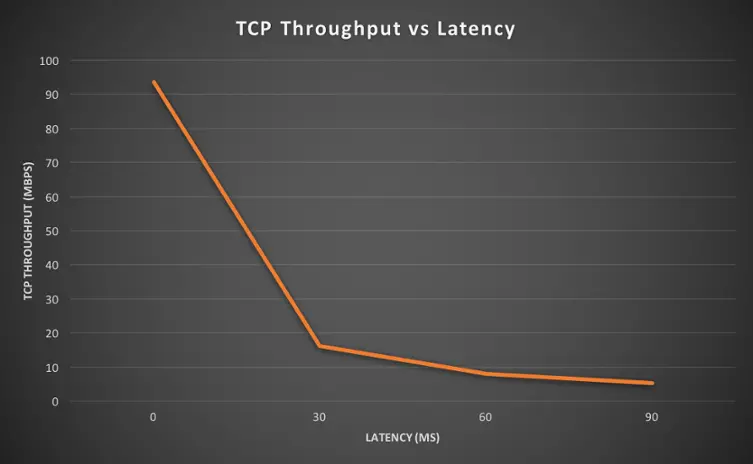
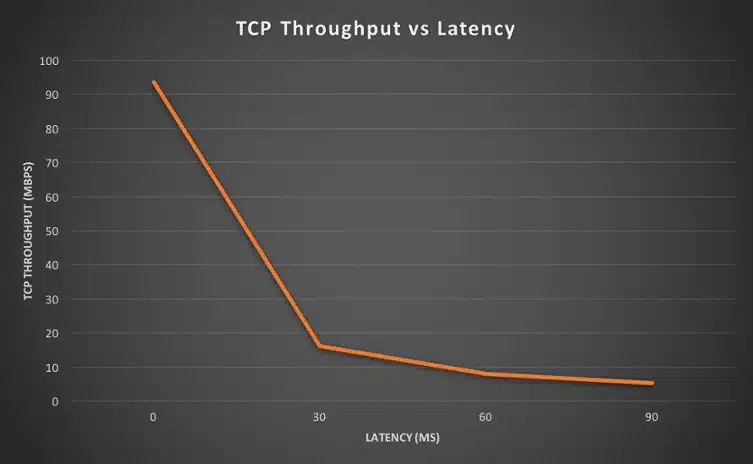
Round trip latency TCP Throughput
0ms 93.5 Mbps
30ms 16.2 Mbps
60ms 8.07 Mbps
90ms 5.32 Mbps

Nehmen wir hypothetisch an, dass kein Paket verloren geht:

  • Der Sender wird ein erstes Kontingent an Datenpaketen gleichzeitig senden (entsprechend dem TCP Congestion Window). Erhält der Sender das Bestätigungspaket, wird das TCP Congestion Window vergrößert. Sukzessiv wird also die Anzahl an Paketen, die in einem bestimmten Zeitraum gleichzeitig gesendet werden können, steigen (Durchsatzrate). Die Verzögerung, mit welcher die Bestätigungspakete empfangen werden (=Latenz), hat einen Einfluss darauf, wie schnell das TCP Congestion Window vergrößert wird (entsprechend auch auf die Durchsatzrate). 
    Ist die Latenz hoch, bedeutet dies, dass der Sender länger untätig ist (keine neuen Pakete sendet), was wiederum die Geschwindigkeit, mit welcher die Durchsatzrate steigt, reduziert. 
    Die Testwerte (Quelle: http://smutz.us/techtips/NetworkLatency.html) sind sehr deutlich: Warum wird TCP durch wiederholte Paketsendungen (Retransmissions) und Datenverlust beeinflusst?

Der TCP Congestion Window Mechanismus geht folgendermaßen mit fehlenden Bestätigungspaketen um:

  • Bleibt das Bestätigungspaket nach einer fest definierten Zeit (Timer) aus, wird das Paket als verloren eingestuft und das TCP Congestion Window, also die Anzahl der gleichzeitig gesendeten Pakete, wird halbiert (die Durchsatzrate entsprechend auch – dies korrespondiert mit der Wahrnehmung einer restringierten Kapazität irgendwo auf dem Verbindungsweg seitens des Senders); die Größe des TCP Windows kann wieder ansteigen, wenn die Bestätigungspakete korrekt empfangen werden.

Datenverlust hat zwei Effekte auf die Geschwindigkeit der Datenübertragung:

  • Die Pakete müssen erneut gesendet werden (selbst wenn lediglich das Bestätigungspaket verloren gegangen ist, die Datenpakete aber empfangen wurden) und das TCP Congestion Window wird keine optimale Durchsatzrate zulassen: Dies gilt unabhängig vom Grund für den Verlust der Bestätigungspakete (Überlastung, Serverprobleme, Art der Paketschnürung, …) Ich hoffe, dies hilft Ihnen dabei, die Auswirkungen von Retransmissions/Datenverlusten auf die Effektivität Ihrer TCP-Anwendungen zu verstehen.
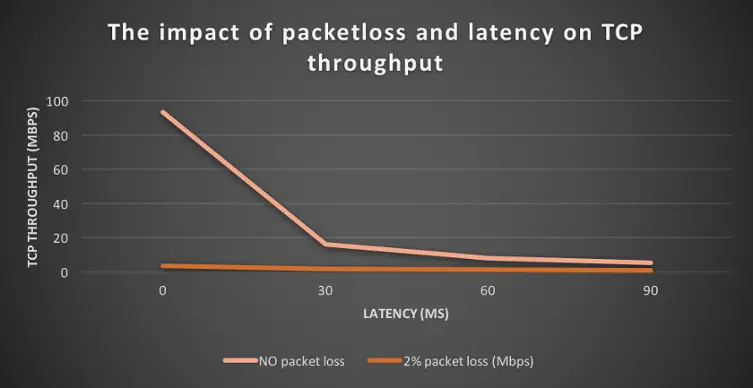
With 2% packetloss, the TCP throughput is between 6 and 25 lower than with no packet loss.

Round trip latency TCP Throughput with no packet loss TCP Throughput with 2% packet loss
0 ms 93.5 Mbps 3.72 Mbps
30 ms 16.2 Mbps 1.63 Mbps
60 ms 8.7 Mbps 1.33 Mbps
90 ms 5.32 Mbps 0.85 Mbps

Data theft can affect anyone

Data loss or theft can be a worrying experience for any business. As major retailers, including Home Depot, Staples and Kmart, as well as banks and healthcare organisations have already experienced in the past year, cyberattacks can occur at any time and come from any source.

Unfortunately, you can’t have it all in the modern world, because it’s impossible to automate your data and stay competitive if you insulate yourself from digital technology. Data collection is simply a part of today’s way of life that we all have to accept, but still, businesses increasingly need to guarantee a high level of security and protect the privacy of individuals.

Fortunately, data theft can sometimes be avoided or simply kept to a minimum. The following is a list of things that companies can do to avoid data theft:

  • Limit data sharing with third parties
  • Encrypt online payment pages
  • Ignore suspicious or unknown emails
  • Limit the number of sites you share your credit card information with
  • Avoid giving out too much personal information on social media sites
  • Change PINs and passwords frequently
  • Freeze accounts that you suspect may be compromised 
  • Monitor accounts for questionable charges

Once you have adopted these simple guidelines, it is important that you continue to be vigilant against data theft, because hackers resort to all kinds of methods to penetrate corporate databases. To protect your databases as much as possible, you should apply the following five steps when a data theft is suspected:

  • Communication is an important factor after a data theft: inform all employees that a data breach has occurred and that you as a company take responsibility for it. Also be open and clear about why this data theft could happen. Then you should inform the affected users about how they can clear up the impact of a data theft. Finally, have an honest discussion with your staff about the source of the problem in an effort to avoid similar problems in the future.
  • Consult your IT engineers: Forensics is crucial to analyse network traffic and find out why such a data breach occurred. Therefore, be proactive and save all your organisation’s traffic, including all data packets, for later analysis. The archived traffic can then be reviewed by security experts to detect anomalies and determine where and when a data breach occurred.
  • Use a proactive security system: Although firewalls can prevent certain types of external attacks, they will do nothing against malware that has infiltrated the organisation’s network. A multi-layered approach that includes a hierarchical search by date, event, IP address and extent of damage is the best way to address security solutions.
  • Review the data that was stolen to determine the extent of the damage: Change all passwords and contact your credit bureaus to inform them that a data theft has occurred so that appropriate action can be taken. Also contact all financial institutions, such as banks and credit card companies, immediately to prevent unauthorised transactions.
  • Finally, most countries have passed laws dealing with data breaches, which include, for example, that a person who has been a victim of data theft must be notified immediately. Make sure your employees have also signed a confidentiality and non-disclosure agreement to avoid further liability should an employee be responsible for the data theft. In addition, having a privacy policy in place will be the first step in protecting data in the future.
  • While corporate data theft increases in number and severity, access to the original data packets is critical to quickly identify the source and extent of security incidents on the network. With its unique ability to capture and store critical network traffic from hundreds of alerts per day, Savvius Vigil 2.0 is the only solution to provide network traceability in the event of a data theft that occurred so far in the past that the network traffic that occurred is no longer available with traditional solutions.

Thank you for your upload

Skip to content